When your Hosted Isomux office goes live, I email you these tips from
hello@isomux.com, on the day shown on each. This page
has the same text as the emails. Each email also has a link to
unsubscribe.
Day 0
Your Isomux office is ready
Your office is up at your office address.
To sign in the first time, get your owner invite from your dashboard at https://cloud.isomux.com and open it in the browser where you will use the office.
I set up your office so three welcome agents are waiting for you: one each for Claude, Codex and OpenCode. The OpenCode one runs on a free model, so you can talk to it right away. The others will walk you through connecting your subscriptions when you first message them.
One advantage of running your office on your own private virtual server is that you can connect from any of your devices. I especially like to check in from my phone.
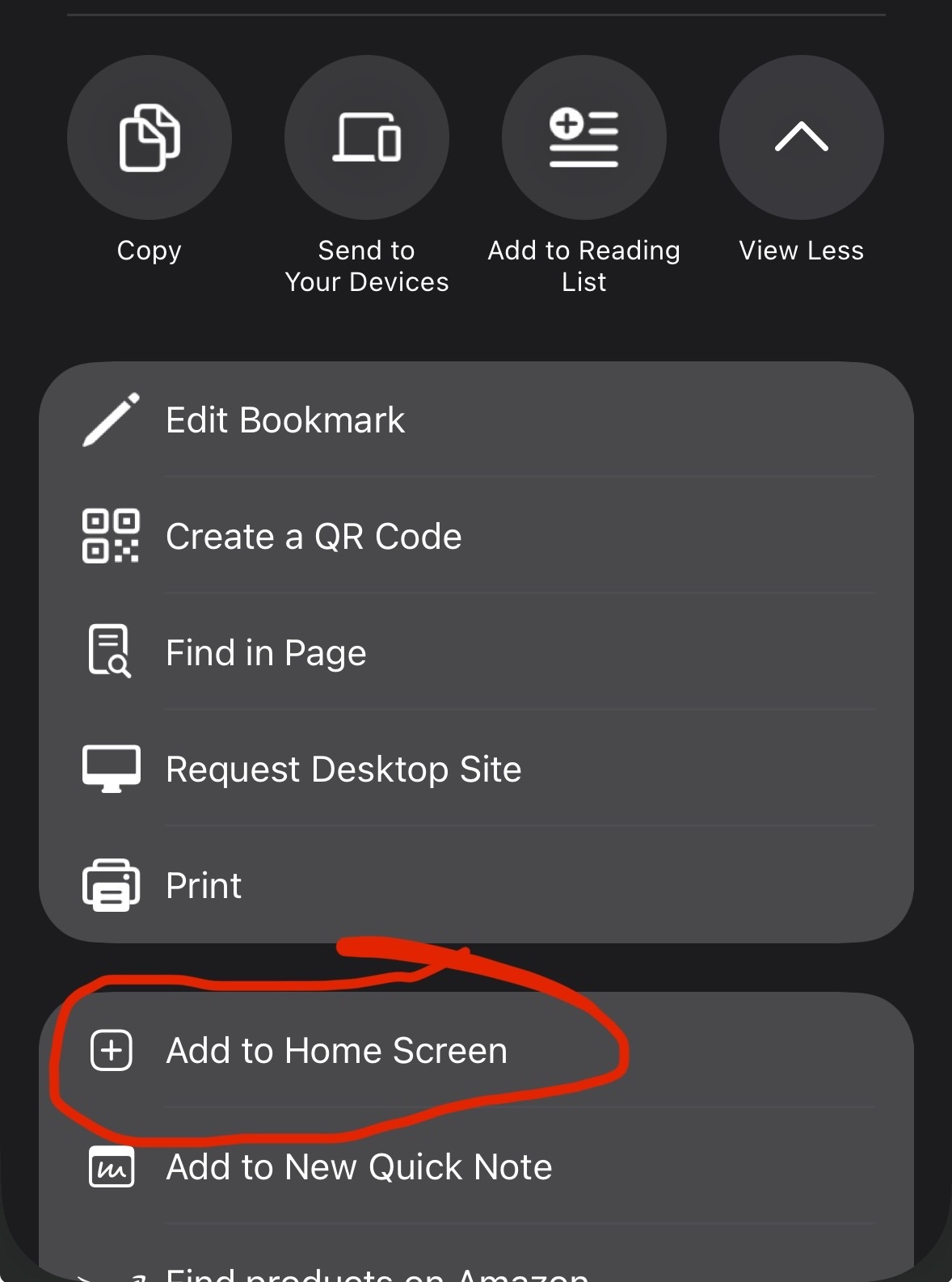
To add your phone: in the office, Settings → Sign-in links → Generate device link. Send the link to yourself and open it on your phone. For the native app feel, you can "install" the website as an app. On iPhone, open the Share menu in the browser and "Add to Home Screen" (here's what it looks like: https://isomux.com/hosted-welcome#home-screen). On Android, Chrome offers to install it.
Over the next two weeks, I'll send you a few short tips. Reply to any of them if something does not work; I'll read every email and make sure to improve Isomux.
Thank you! Nil
Day 1
Bring your collaborators in
Isomux shines when you lean into the multiplayer aspects. When I work on a project with someone, I create a room for the project and invite them.
I also add friends and family with no previous experience with agents. It's my favorite way of showing them what AI can do for them. I found that even non-technical people will embrace it!
To bring someone in: Settings → Members → New member. Choose which rooms they see and send them the sign-in link.
your office address
Nil
Day 3
Agent collaboration
Isomux agents can discover and message each other.
For software development, I like to use the /pair-programming built-in skill to pair two agents up. For example, Claude builds and Codex reviews.
You may have also noticed that each Isomux room also has a hatch that leads to a basement. That's where I keep the agents I never talk to.
I like to keep a project's "Lead Agent" in the front room. When it has work to hand out, it dispatches it to workers in the basement. This way, the Lead Agent stays available for me and its context stays clear of implementation details.
your office address
Nil
Day 6
Your own app store
My agents have built dozens of apps for me. Like Isomux, they work 24/7 and can be opened from any device, behind the office's sign-in.
What makes these apps powerful is that they're integrated with the agents. Here are a couple of examples, for inspiration.
One of my apps is a monitoring dashboard for Hosted Isomux. Every 30 minutes, it checks all my systems. If anything looks off, the app tells one of my agents to look into it right away. This helps me be on top of things as a one-person company.
Another app is a daily video pipeline for the Wall Game's YouTube channel (https://www.youtube.com/@wallgameio). An agent cuts game clips into videos and queues them in the app. I watch them in the app and sign off or give feedback. Feedback goes back to the agent, while signed-off videos get posted to social media by the app itself. It even shows me view counts.
Every app shows in the Apps tab, like your own app store. Members who share a room share its apps, and you can install an app on your phone's Home Screen as its own app, just like Isomux.
your office address
Nil
Day 10
One Inbox for every decision
When agents need you (a decision, an answer, a step only you can take), they open an ask in your Inbox instead of waiting in a chat.
I built the Inbox because I run all my projects from my Isomux office, and things were falling through the cracks. Now, I ask my agents to send everything they need from me there; I call it the "Decision Feed". For urgent asks, agents even send me notifications.